Why AI search ignores your product pages
 By Daniela Ricaud, founder of Pretty Citable
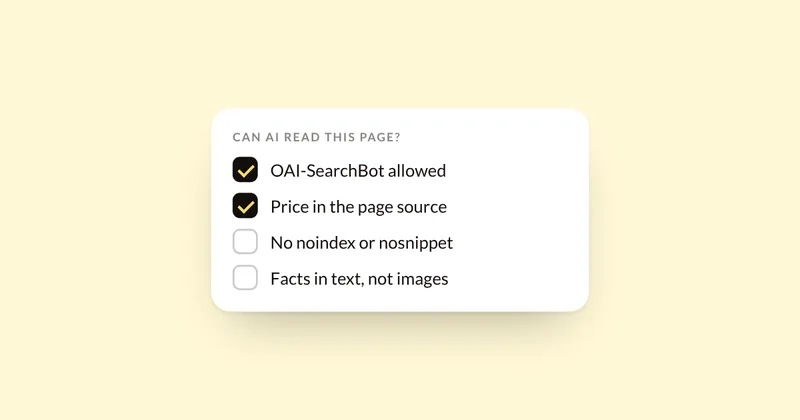
When a product page never shows up in AI answers, check access before content. The most common technical causes are an AI search crawler blocked in robots.txt or by Cloudflare, product details that only appear after JavaScript runs, a noindex or nosnippet tag, key facts locked in images or widgets, no price in the page, and a password-protected store. Most take a few minutes to check.
1. The AI search crawler is blocked
Each AI company runs separate crawlers for search and for training, and blocking the wrong one hides you from answers.
- ChatGPT: OAI-SearchBot finds pages for ChatGPT search. OpenAI says a site that blocks it won't be shown in ChatGPT search answers. GPTBot is the training crawler, and blocking it doesn't remove you from search.
- Perplexity: PerplexityBot surfaces and links sites in Perplexity's answers.
- Claude: Claude-SearchBot indexes pages for search, and Claude-User fetches a page when someone asks about it. ClaudeBot is the training crawler.
- Google: AI Overviews and AI Mode use Googlebot. Google-Extended only controls Gemini training and grounding, and Google says it doesn't affect inclusion in Search.
Check: open yourstore.com/robots.txt and look for a Disallow line under any of those names. OpenAI says robots.txt changes take about 24 hours to reach its search.
2. Cloudflare blocks AI crawlers for you
If your domain runs through your own Cloudflare account, its settings may block AI crawlers before robots.txt is even read. Since July 2025, Cloudflare has blocked AI training crawlers by default on new domains unless the owner chooses otherwise. Under its newer defaults from September 2026, search crawlers stay allowed, and crawlers that do both search and training count as training crawlers.
Check: in the Cloudflare dashboard, open AI Crawl Control, then the Crawlers tab. The Action column shows what each crawler is allowed to do, and you can switch it to Allow.
3. Product details only appear after JavaScript runs
A 2024 study by Vercel and MERJ found that none of the major AI crawlers it tested ran JavaScript, including OpenAI's, Anthropic's and Perplexity's. Gemini, which uses Googlebot, did. The study is two years old, so test your own pages. Google also warns that product markup added by JavaScript makes Shopping crawls less frequent and less reliable.
Check: open a product page, press Ctrl+U (Cmd+Option+U on a Mac) to view the source, and search for your price and the first line of your description. If they aren't in the source, a crawler that doesn't run JavaScript can't see them.
4. A noindex or nosnippet tag hides the page
Google says a page must be indexed and eligible to show a snippet to appear in AI Overviews or AI Mode. The noindex, nosnippet, data-nosnippet and max-snippet controls all limit what Google can show, AI features included. Apps sometimes add these without telling you.
Check: paste the product URL into Search Console's URL Inspection tool. It tells you whether the page is indexed and why not.
5. The key facts live in images, tabs or widgets
Ingredient lists in a product photo, sizing in a pop-up, or reviews loaded by a widget are easy for shoppers to see and hard for crawlers to read. Google's advice for its AI features is to make important content available in text.
Fix: put who it's for, what's in it, sizes and the main differences in plain text on the page. Keep any markup in line with that visible text, since Google says not to mark up content readers can't see.
6. There's no price in the page
Google's merchant listing rules require a price and currency in the product's offer, and only pages where a shopper can buy the product qualify. A price that loads late, or only appears in the cart, weakens the page for shopping results.
Check: the same Ctrl+U test as step 3, plus Google's Rich Results Test on one product URL.
7. The store is password-protected
Shopify says a password-protected store hides every page from visitors and search engines. It sounds obvious, and it's a common leftover after a relaunch or a pre-sale.
8. Your description matches every other retailer's
Using the manufacturer's description won't get you penalized. Google's John Mueller has said it's fine. When many pages share the same text, though, Google may show just one of them. If Sephora, Amazon and your own site all carry the same paragraph, your page has nothing that makes it the best one to show.
Fix: add what only you can say: who it suits, how it compares with your other products, and the questions customers actually email you about.
Where the audit fits
Most of these checks take a few minutes each. The AI Visibility Audit ($500) runs all of them on your store, tests what AI tells your buyers, and ranks the fixes by what's costing you recommendations today. If your product pages are on Shopify, here's the Shopify version, step by step.
Sources
- OpenAI: Overview of OpenAI crawlers
- Perplexity: Perplexity crawlers
- Anthropic: Does Anthropic crawl content from the web?
- Google: Google's common crawlers, updated Oct 30, 2026
- Cloudflare: Content Independence Day and AI options, Jul 1, 2026
- Cloudflare: Manage AI crawlers
- Vercel: The rise of the AI crawler, Dec 17, 2024
- Google Search Central: Understand JavaScript SEO basics
- Google Search Central: Merchant listing structured data
- Google Search Central: AI features and your website
- Google Search Central: Structured data general guidelines
- Shopify Help Center: Password page
- Search Engine Journal: Google on duplicate product descriptions, Sep 24, 2021
See where your brand stands
Run three buyer questions yourself in 60 seconds, or get the full AI Visibility Audit: 30 questions on four engines, a competitor map and a ranked fix list in 5 business days.