How to structure collection pages for Google AI Overviews
 By Daniela Ricaud, founder of Pretty Citable
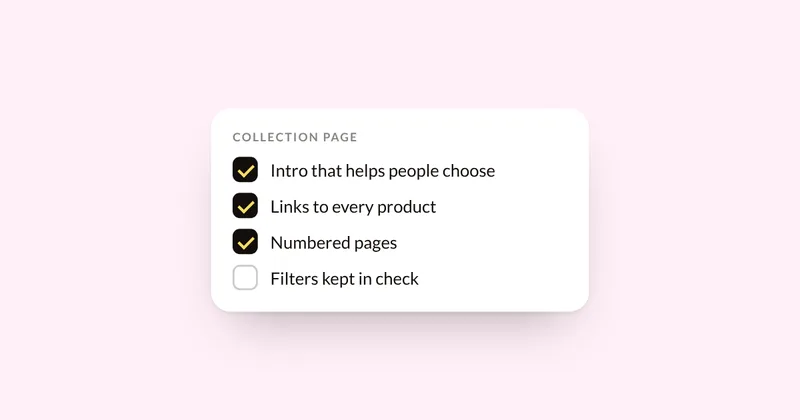
Give each collection page a short text intro that answers how to choose from it, link every product with plain links, give each page of results its own URL, and keep filtered URLs from multiplying. Google says AI Overviews and AI Mode have no extra requirements beyond regular Search, so this is ordinary ecommerce SEO done carefully. It matters because one 2026 study of ecommerce stores found collection pages cited far more often than product pages.
Why collection pages matter
An agency study published by The HOTH in October 2026 looked at 886 pages cited across 5,362 AI responses, using Ahrefs Brand Radar data from its own client stores. Guides and blog posts were cited most. Category and collection pages came second, at 31.9% of AI Overview responses and 46.2% of AI Mode responses. Product pages came in under 8% on both. Treat it as one vendor's data: five stores, two of which supplied 92% of the pages. It still points one way. When someone asks which product to buy, AI tends to cite a page that compares several.
Google says there are no additional requirements to appear in AI Overviews or AI Mode, and that these features run several related searches across subtopics. A collection page that helps shoppers choose fits those searches well.
Step 1: Write a short intro that helps people choose
Most collection pages are a grid of products with a title on top. Add two to four sentences of text above or below the grid: who the products are for, how they differ, the price range, and how to pick. Google's advice for its AI features is to make important content available in text.
In Shopify: Products, then Collections, open the collection, and edit its description.
Step 2: Link every product with plain links
Google recommends linking from menus to categories, from categories to subcategories, and from those to every product you want indexed. Products that can only be found through your site search may be missed. Google finds links through standard <a href> links, so links built only with JavaScript can be skipped.
Step 3: Give every page of results its own URL
Google's pagination guidance for ecommerce:
- Give each page a unique URL and link the pages in order.
- Don't point every page's canonical tag at page 1.
- Google's crawlers don't click "Load more" or scroll, so products that only appear on scroll may never be seen. If your theme uses infinite scroll, make sure it also has numbered pages with real URLs.
Step 4: Keep filters from multiplying your pages
Filters by size, color or price create a new URL for every combination. Google calls this faceted navigation the most common source of overcrawling.
- If filtered pages don't need to be in search, block them in robots.txt so crawlers spend their time on your real collections.
- If a filtered page is worth indexing (for example, "vegan lipsticks"), make it a real collection with its own intro.
- Google recommends returning a 404 when a filter combination has no products.
In Shopify: filters appear as URL parameters, such as ?filter.v.option.color=red. Check Search Console's Pages report to see whether they're getting indexed. To change your robots.txt, Shopify uses a robots.txt.liquid template, and it recommends saving a copy of your current robots.txt first.
Step 5: Write titles and descriptions that say what's in the collection
In Shopify's search engine listing settings, page titles over 70 characters and meta descriptions over 320 characters may be cut off. Name the category the way shoppers say it, like "Vitamin C serums for sensitive skin". If you change a collection's URL handle, set up a redirect, since Shopify warns that frequent changes can hurt search visibility.
How to see whether it's working
- Search Console's Generative AI report shows how often your pages appear in AI Overviews and AI Mode. Here's what it shows and what it hides.
- Ask Google the questions your buyers ask and note which pages it cites. Here's a simple way to test it.
Where the audit fits
The AI Visibility Audit ($500) tests your buyers' questions across the AI engines, shows which pages get cited in your place, and ranks the fixes for your collections and products. For product feeds and product pages, see how to get Shopify product pages into Google AI Overviews.
Sources
- The HOTH: Ecommerce AI citation report, Oct 1, 2026
- Google Search Central: AI features and your website
- Google Search Central: Help Google understand your ecommerce site structure
- Google Search Central: Pagination and incremental page loading
- Google Search Central: Managing crawling of faceted navigation URLs
- Google Search Central Blog: Crawling December, faceted navigation, Dec 17, 2024
- Google Search Central: Designing a URL structure for ecommerce sites
- Shopify Help Center: Collections
- Shopify Help Center: Collection settings
- Shopify.dev: Storefront filtering
- Shopify.dev: Customize robots.txt
See where your brand stands
Run three buyer questions yourself in 60 seconds, or get the full AI Visibility Audit: 30 questions on four engines, a competitor map and a ranked fix list in 5 business days.